> ## Documentation Index
> Fetch the complete documentation index at: https://docs.dify.ai/llms.txt
> Use this file to discover all available pages before exploring further.
# Cloudflare Workers を使用したカスタム API のデプロイ
> このドキュメントは AI によって自動翻訳されています。不正確な部分がある場合は、[英語版](/en/cloud/use-dify/workspace/api-extension/cloudflare-worker) を参照してください。
## はじめに
Dify カスタム API は API Endpoint としてアクセス可能な公開ネットワークアドレスを使用する必要があるため、カスタム API を公開ネットワークアドレスにデプロイする必要があります。
ここでは Cloudflare Workers を使用してカスタム API をデプロイします。
[Example GitHub Repository](https://github.com/crazywoola/dify-extension-workers) をクローンします。このリポジトリには簡単なカスタム API が含まれており、これをベースに変更できます。
```bash theme={null}
git clone https://github.com/crazywoola/dify-extension-workers.git
cp wrangler.toml.example wrangler.toml
```
`wrangler.toml` ファイルを開き、`name` と `compatibility_date` をアプリケーション名と互換性日付に変更します。
ここで注意が必要な設定は、`vars` 内の `TOKEN` です。Dify でカスタム API を追加する際に、この Token を入力する必要があります。セキュリティ上の理由から、Token としてランダムな文字列を使用することをお勧めします。ソースコードに直接 Token を書き込むのではなく、環境変数を使用して Token を渡すべきです。そのため、wrangler.toml をコードリポジトリにコミットしないでください。
```toml theme={null}
name = "dify-extension-example"
compatibility_date = "2023-01-01"
[vars]
TOKEN = "bananaiscool"
```
このカスタム API はランダムな Breaking Bad の名言を返します。`src/index.ts` でこのカスタム API のロジックを変更できます。この例は、サードパーティ API とのやり取り方法を示しています。
```typescript theme={null}
// ⬇️ implement your logic here ⬇️
// point === "app.external_data_tool.query"
// https://api.breakingbadquotes.xyz/v1/quotes
const count = params?.inputs?.count ?? 1;
const url = `https://api.breakingbadquotes.xyz/v1/quotes/${count}`;
const result = await fetch(url).then(res => res.text())
// ⬆️ implement your logic here ⬆️
```
このリポジトリはビジネスロジック以外のすべての設定を簡略化しています。`npm` コマンドを直接使用してカスタム API をデプロイできます。
```bash theme={null}
npm install
npm run deploy
```
デプロイが成功すると、公開ネットワークアドレスが取得できます。このアドレスを Dify の API Endpoint として追加できます。`endpoint` パスを忘れないでください。このパスの具体的な定義は `src/index.ts` で確認できます。
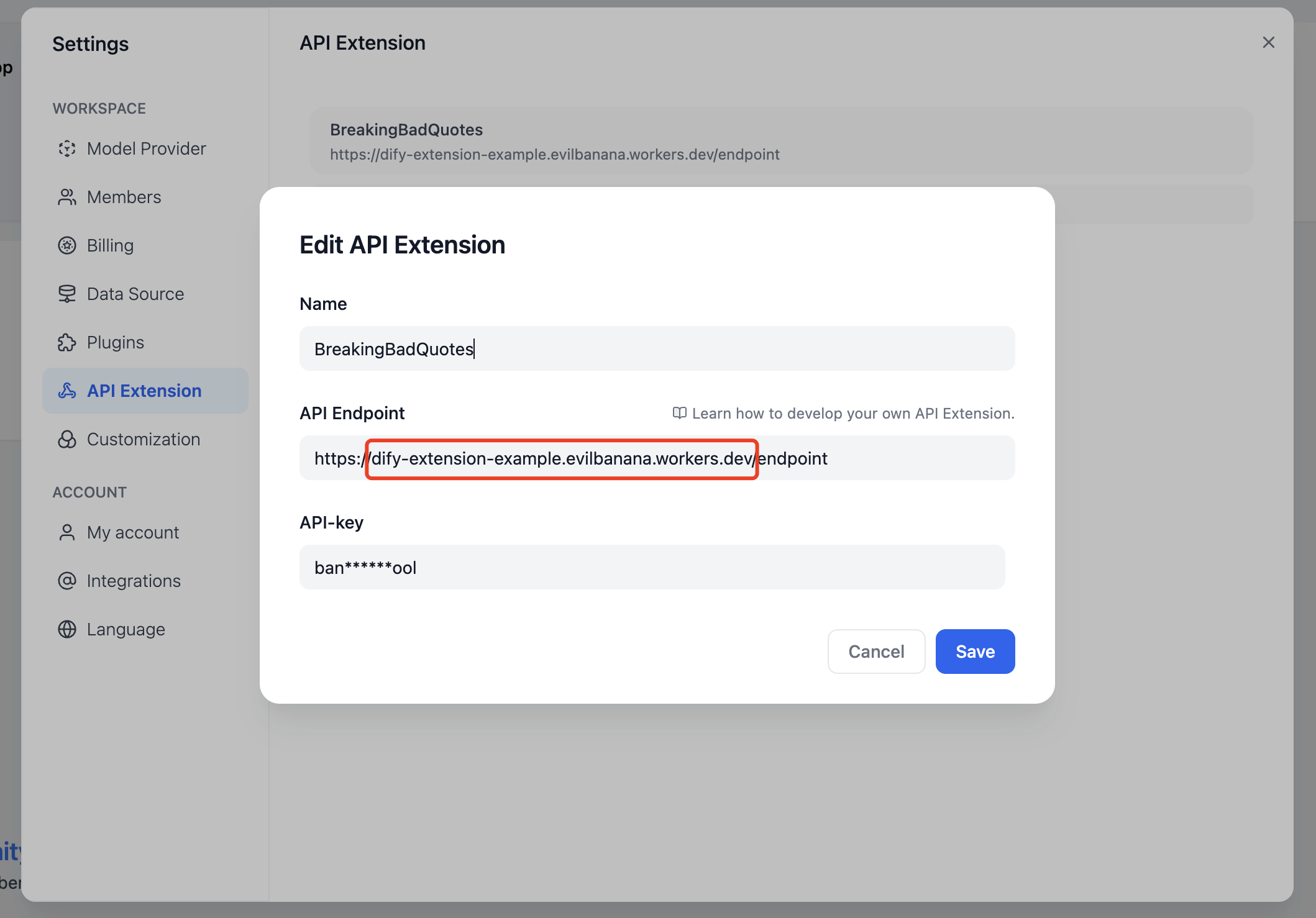
また、`npm run dev` コマンドを使用してローカルにデプロイしてテストすることもできます。
```bash theme={null}
npm install
npm run dev
```
関連する出力:
```bash theme={null}
$ npm run dev
> dev
> wrangler dev src/index.ts
⛅️ wrangler 3.99.0
-------------------
Your worker has access to the following bindings:
- Vars:
- TOKEN: "ban****ool"
⎔ Starting local server...
[wrangler:inf] Ready on http://localhost:58445
```
その後、Postman などのツールを使用してローカルインターフェースをデバッグできます。
## Bearer Auth について
```typescript theme={null}
import { bearerAuth } from "hono/bearer-auth";
(c, next) => {
const auth = bearerAuth({ token: c.env.TOKEN });
return auth(c, next);
},
```
Bearer 検証ロジックは上記のコードにあります。`hono/bearer-auth` パッケージを使用して Bearer 検証を実装しています。`src/index.ts` で `c.env.TOKEN` を使用して Token を取得できます。
## パラメータ検証について
```typescript theme={null}
import { z } from "zod";
import { zValidator } from "@hono/zod-validator";
const schema = z.object({
point: z.union([
z.literal("ping"),
z.literal("app.external_data_tool.query"),
]), // Restricts 'point' to two specific values
params: z
.object({
app_id: z.string().optional(),
tool_variable: z.string().optional(),
inputs: z.record(z.any()).optional(),
query: z.any().optional(), // string or null
})
.optional(),
});
```
ここでは `zod` を使用してパラメータの型を定義しています。`src/index.ts` で `zValidator` を使用してパラメータを検証できます。`const { point, params } = c.req.valid("json");` で検証済みパラメータを取得します。
ここでの `point` は 2 つの値しかないため、`z.union` を使用して定義しています。`params` はオプションのパラメータなので、`z.optional` を使用して定義しています。その中には `inputs` パラメータがあり、これは `Record` 型です。この型は、キーが string で値が any のオブジェクトを表します。この型は任意のオブジェクトを表すことができます。`src/index.ts` で `params?.inputs?.count` を使用して `count` パラメータを取得できます。
## Cloudflare Workers のログを取得
```bash theme={null}
wrangler tail
```
***
**参考資料**
* [Cloudflare Workers](https://workers.cloudflare.com/)
* [Cloudflare Workers CLI](https://developers.cloudflare.com/workers/cli-wrangler/install-update)
* [Example GitHub Repository](https://github.com/crazywoola/dify-extension-workers)